Understanding CodeSmith Generator's Code Behind Model
- Autumn Wilkins (Unlicensed)
- Anonymous
- Cody Smith (Unlicensed)
When you're writing a CodeSmith Generator template, you're dealing with two distinct kinds of code:
- The code being generated
- The scripting code that controls the generation process
As far as CodeSmith Generator is concerned, the first of these is just text, and can be any language at all: VB, SQL, Fortran, COBOL, Esperanto...as long as it can be represented by a string of characters, CodeSmith Generator can generate it. This generated code is stored in the CodeSmith Generator templates, and copied at runtime to the output file, or created on the fly by CodeSmith Generator.
The scripting code is both more and less limited than the generated code. It's more limited in that it can only be VB, C#, or JScript code. But it's less limited in that you have two choices about where to store it. You can either mix it in to the template directly, storing it in <script> blocks, or you can store it in separate code behind files. A code behind file is a source code file containing nothing but scripting code that's attached to a template file by use of attributes within the CodeTemplate directive.
For example, here's a template that makes use of a code behind file:
<%@ CodeTemplate Src="VBCodeBehind.cst.vb" Inherits="UtilityCodeTemplate" Language="VB" TargetLanguage="VB" %>
<%@ Property Name="ClassName" Type="System.String" Category="Options" Description="The name of the generated class." %>
' This class generated by CodeSmith on <%= DateTime.Now.ToLongDateString() %>
<%= GetAccessModifier(Accessibility) %> Class <%= ClassName %>

    Public Sub New()
    End Sub

        ' Write your class here

End Class
Note that this template makes use of a function GetAccessModifier and a property Accessibility, even though neither one of them is defined in the template. That's because they're defined in a separate code-behind file. Here are the contents of the code-behind file (VBCodeBehind.cst.vb):
Imports System.ComponentModel
Imports CodeSmith.Engine

' This class contains utility functions that can be
' used across many templates

Public Class UtilityCodeTemplate
    Inherits CodeTemplate

    Private _Accessibility As AccessibilityEnum = AccessibilityEnum.Public

    <Category("Options"),  _
    Description("Accessibility of the generated class")> _
    Public Property Accessibility As AccessibilityEnum
        Get
            Return _Accessibility
        End Get
        Set
            _Accessibility = value
        End Set
    End Property

    Public Enum AccessibilityEnum
        [Public]
        [Protected]
        [Friend]
        [ProtectedFriend]
        [Private]
    End Enum
    Public Function GetAccessModifier(ByVal accessibility As AccessibilityEnum) As String
        Select accessibility
            Case AccessibilityEnum.Public
                GetAccessModifier = "Public"
            Case AccessibilityEnum.Protected
                GetAccessModifier = "Protected"
            Case AccessibilityEnum.Friend
                GetAccessModifier = "Friend"
            Case AccessibilityEnum.ProtectedFriend
               GetAccessModifier = "Protected Friend"
            Case AccessibilityEnum.Private
                GetAccessModifier = "Private"
            Case Else
                GetAccessModifier = "Public"
        End Select
    End Function
End Class
The CodeTemplate directive ties the code-behind file to the template. The Src attribute of the directive specifies the filename of the code-behind file, and the Inherits attribute of the directive specifies the class in the file that the template is based on. Note that this class must itself inherit, directly or indirectly, from CodeSmith.Engine.CodeTemplate.
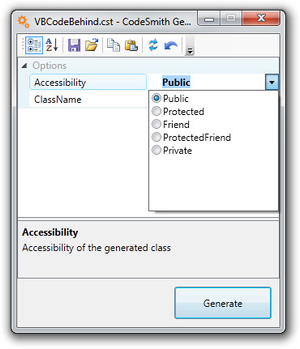
Because Accessibility is defined as a property of the UtilityCodeTemplate class, CodeSmith Generator includes it in the template's property sheet when the template is opened in Template Explorer:
There are two main advantages to moving code to a code-behind file:
- It makes your templates easier to understand by separating the generated code from the scripting code that drives the generation process.
- It makes it possible to easily reuse utility functions across many templates by moving them to shared code-behind files.